Deploying PolicyClue On‑Premise
You can run PolicyClue on‑premise using Docker Compose. The official configuration files and setup instructions are available on GitHub:
PolicyClue/policyclue-docker-compose
System Requirements
Hardware (small tenants) - 4 vCPU, 12 GB RAM, 50+ GB disk (SSD recommended).
Operating System - Linux host with Docker Engine and Docker Compose. See the Docker installation docs if you don't have them yet — Docker Compose ships alongside Docker Engine.
Networking - Public HTTPS for the portal (behind a reverse proxy such as Traefik). - Access to container ports internally (DB, Redis, Elasticsearch).
Security
- Use your own TLS certificates at the reverse proxy.
- Provide strong passwords via .env (never commit secrets).
- Restrict DB and ES to the private network; expose only HTTPS.
What the stack includes - PostgreSQL, Redis, Elasticsearch, PolicyClue API, the webapp, and a Traefik reverse proxy are started by Docker Compose.
Ports and HTTPS
- Default port: the stack exposes HTTP on host port 80 via Traefik.
- HTTPS: terminate TLS at Traefik and (optionally) redirect ports 80 and 443 with ACME to auto‑issue certificates. You can also use a custom CA.
- Security warning: never expose plain HTTP directly to the public internet. It is intended only for local reverse‑proxy ingress.
Setup
-
Clone the repository:
git clone https://github.com/PolicyClue/policyclue-docker-compose.git cd policyclue-docker-compose -
Copy
.env.exampleto.envand fill in the secret values:Fill in every required value — the API refuses to boot if secrets are missing. Avoid renaming services unless you know the implications.cp .env.example .env -
Optionally, enable additional services using the override template. Rename
docker-compose.override.templatetodocker-compose.override.ymland uncomment the services you need:# Rename this file to docker-compose.override.yml and enable additional inclusions below include: # - docker-compose-acme.yml # uncomment this line to use it # - docker-compose-pgadmin.yml # uncomment this line to use it # - docker-compose-ollama.yml # uncomment this line to use it (self-hosted LLM for AI features) -
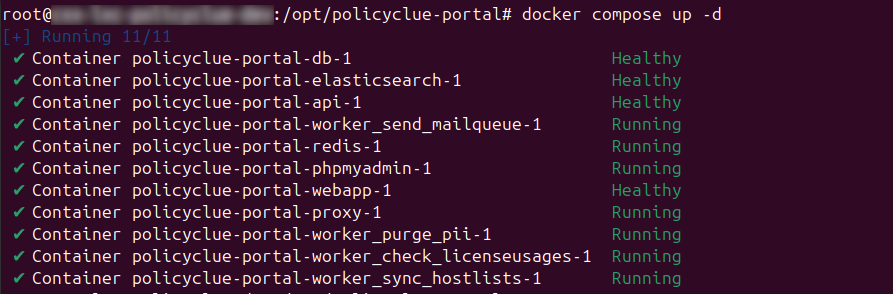
Start the stack:
Database migrations are performed automatically on container startup. After services are healthy, open the portal URL and sign up with the email you want to use as the first administrator.docker compose up -d -
Promote your first administrator to global admin. Sign up through the portal once with the email you want to use as the initial administrator, then run the promotion query on the Docker host (replace the email):
An empty result means the email isn't registered in the portal yet — sign up first, then re-run. Once promoted, sign back in to create your first tenant and configure policies and matching rules.docker exec postgres psql -U pclue -d policycluedb -c \ "UPDATE admins SET is_global_admin = true WHERE email = 'admin@example.com' RETURNING id, email, is_global_admin;"
Registry credentials
Contact PolicyClue to receive Docker registry login credentials for pulling container images. Sign in on the Docker host with docker login using the registry host and credentials you received. Keep these credentials secure and restrict access to trusted administrators.
Microsoft Teams DLP (On-Premise)
Microsoft Teams DLP monitoring uses the Microsoft Graph API, which sends webhook notifications to PolicyClue when messages are created or edited. This requires Microsoft to reach your PolicyClue portal over the internet.
If your portal is publicly accessible (e.g. behind a reverse proxy with a public domain), no additional configuration is needed. The portal's PCLUE_PORTAL_HOST is used automatically as the webhook endpoint (with https:// prepended).
If your portal is behind a firewall and not directly reachable from the internet, you must expose the webhook path so Microsoft Graph can deliver notifications. You have two options:
Option A: Expose only the webhook path (recommended)
Configure your reverse proxy or firewall to forward only the path /api/m365/notifications from an externally accessible URL to your internal portal. No other portal endpoints need to be exposed.
Example with a Cloudflare Tunnel, Azure App Proxy, or nginx reverse proxy:
External: https://policyclue-webhook.yourcompany.com/api/m365/notifications
    → Internal: http://portal:8000/api/m365/notifications
Then enter the external base URL (e.g. https://policyclue-webhook.yourcompany.com) in the External Base URL field on the Deployment → Microsoft 365 → Credentials page. PolicyClue appends /api/m365/notifications automatically.
Option B: Use a tunnel service
Services like Cloudflare Tunnel or Azure App Proxy can expose an internal service without opening firewall ports. Route only the /api/m365/notifications path through the tunnel and enter the tunnel's public base URL in the portal.
What exactly needs to be reachable
| Path | Direction | Purpose |
|---|---|---|
/api/m365/notifications |
Inbound from Microsoft | Graph API delivers message change notifications |
All other portal paths (/api/portal/*, /api/plugin/*, webapp) can remain internal. The webhook endpoint validates all incoming requests via HMAC signatures, so exposing it does not grant access to any other portal functionality.
Verification
After configuring the webhook URL, go to the Status tab in Deployment → Microsoft 365. Both subscriptions (channels and chats) should show as Active. If they remain Pending, Microsoft could not reach the webhook URL - check your firewall rules and reverse proxy configuration.
Services Gateway
Every PolicyClue instance authenticates against the central PolicyClue services gateway, which fronts sandbox analysis, vulnerability lookups, and LLM inference. One basic-auth credential per instance, rotated centrally on the gate - no per-backend secrets in this .env.
SERVICES_GATE_URL=https://pclue.kgq.ch
SERVICES_GATE_USER=<this-instance>
SERVICES_GATE_PASSWORD=<this-instance-password>
Request your instance's credentials from support@policyclue.com. The API refuses to boot if any of the three are missing - vulnerability scanning is gateway-only and not optional.
If you self-host one of the backends (e.g. your own sandbox), see the corresponding override section below.
LLM
Every PolicyClue instance has gateway-hosted LLM access by default. AI features such as AI Generate Training work out of the box - no per-instance LLM configuration is required. The API sends a fixed model alias on every call; PolicyClue ops pick which backend model the alias resolves to on the gateway side, so model upgrades are transparent for customers.
LLM_TIMEOUT_SECONDS=120
LLM_MAX_TOKENS=16384
Routing goes through the central PolicyClue services gateway using SERVICES_GATE_USER + SERVICES_GATE_PASSWORD (see Services Gateway above). The gateway re-injects the real backend token on the way out, so no per-customer LLM credential is required here.
Override: self-hosted LLM
To point this instance at a self-hosted Ollama / LiteLLM / OpenAI direct instead of the gateway, set all three OVERRIDE_LLM_* variables. OVERRIDE_LLM_MODEL must match a model name your endpoint advertises (/v1/models). Override mode skips TLS verification - intended for internal CA-signed services or HTTP Ollama; don't override to a public endpoint without TLS.
| Backend | OVERRIDE_LLM_BASE_URL |
OVERRIDE_LLM_MODEL |
OVERRIDE_LLM_API_KEY |
|---|---|---|---|
| Gateway (default) | (leave empty) | (leave empty) | (leave empty) |
| Self-hosted Ollama | http://ollama:11434/v1 |
qwen2.5:14b |
ollama |
| OpenAI direct | https://api.openai.com/v1 |
gpt-4o-mini |
sk-… |
Ollama on the same stack: uncomment the docker-compose-ollama.yml include line (see step 3 above), set the override URL, and pull the model once:
docker compose exec ollama ollama pull qwen2.5:14b
For CPU-only hosts or minimal GPUs, qwen2.5:7b is a lighter alternative (pull it and set OVERRIDE_LLM_MODEL=qwen2.5:7b).
Health verification: the portal's /api/portal/health/ endpoint includes an llm block reporting connectivity, the configured model, and whether it is served by the backend. The check probes GET /v1/models against whichever endpoint (gateway or override) is active. If the endpoint is unreachable, the healthcheck returns 503.
Breach & Attack Simulation (optional)
The BAS module needs one per-instance environment variable. The phishing
sending-profile pool (lookalike domains, SMTP credentials, sender IPs) is
served by the central PolicyClue services gateway - no per-instance SMTP
setup is required. Activating the bas module for a tenant requires the
services gateway to be reachable (see Services Gateway section above).
BAS_HOSTNAMES=bas.example-hr.com,phish.example.com
BAS_HOSTNAMESis a comma-separated hostname list shared by both phishing landing pages (/public/p/<token>...) and IoC file delivery (/public/ioc/<token>/...). Requests to any other host return 404.- Sending profiles are fetched from the gateway at startup and cached for five minutes. They appear in the simulation editor's profile dropdown with their human-readable description; pick one per simulation.
Reverse-proxy / Caddy / Traefik routing
The BAS hostnames must route to the same API container as the rest of the
portal - they're public endpoints served under the shared /public/* prefix.
The split from the API hostname exists so the requests go through your normal
web-proxy / AV inspection path while the API host stays on the (typically
allow-listed) admin path. Don't allow-list the BAS hostnames past your AV
inline scanner - defeats the test.
The bundled Traefik already routes /public/* to the API container, so no
extra rule is needed when the BAS hostnames hit the bundled stack on port 80.
If you front the docker host with your own reverse proxy, just preserve the
Host: header - the host gate inside FastAPI relies on it.
Example Caddy snippet (alternative: bypass bundled Traefik and proxy straight to the api container):
bas.example-hr.com {
    reverse_proxy api:8000
    # Make sure your inline AV / NDR / web proxy inspects requests to this host.
    # Both phishing landing pages and IoC file delivery come through here.
}
Pre-notify your SOC
IoC drops trigger AV alerts on real endpoints. Tell the SOC you've enabled the module before the first scheduled run so they don't open an incident on what turns out to be a PolicyClue-driven test.
Updates
Pull the latest images, review the Changelog in this documentation, and restart the stack during a planned maintenance window.